

All-in-one platform
Everything your business runs on, in one place.
Scheduling, online booking, dispatch, payments and orders, working together so the day runs simpler. Right for one local studio or thousands of providers across countries.
160%average increase in online bookings
45%reduction in schedule gaps and travel time
98%of dispatchers report increased productivity
Provider scheduling
Everyone’s hours, in sync with Google Calendar.
- Custom travel zonesAvailable as APIDraw each provider’s coverage area, or one company-wide zone, with as many hand-drawn shapes on the map as you need.
- Flexible schedulesSet hours for any mix of dates, weekdays, times, services and locations. Each provider can have as many schedules as they need.
- Calendar viewSee availability, blocked time, travel time and bookings for one or many providers. Drag to move, drag to resize.
- Two-way Google Calendar syncBookings and blocked time stay in sync both ways. Google events with a location count toward travel time.
Client self-booking page
Clients book and reschedule on their own.
One of the most flexible booking pages you can give your clients, and it scales to thousands of users.
- One-on-one and group bookingsFill a class from one time slot, set capacity and course dates, and run the same class several times a day.
- Booking acceptanceAvailable as APIProviders accept or decline each request by email or SMS, so they stay in control of their days.
- Payments, refunds and subscriptionsStripe handles payments and refunds, auto-charges recurring bookings, and lets clients prepay a month ahead.
- Time windowsComing soonClients pick a window. As providers finish jobs, they’re matched with the nearest unassigned booking.
Dispatcher tools
Book the right person in seconds, not minutes.
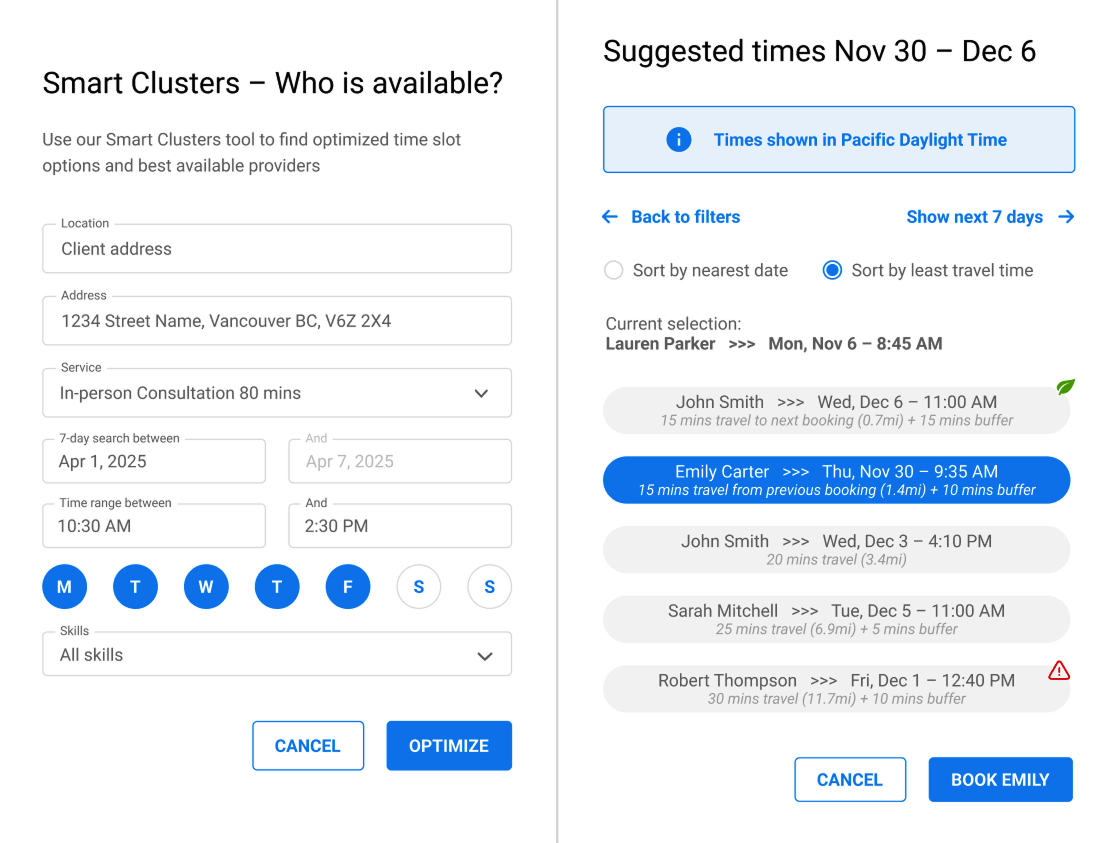
- Who is availableAvailable as APISearch every schedule for the best person, by skills, the client’s preferred days and times, and location.
- Map viewSee every client and each provider’s travel zone, and spot coverage gaps or hotspots that need more people.
- Optimize book of businessAPIComing soonGet suggestions on which bookings to nudge, so providers have no gaps and nothing too close together.
- Route optimizationAPIComing soonImport a file of unassigned bookings and get optimized routes for any number of providers.
“With Smart Clusters, we are down to an average of 23 minutes between appointments. We operate with fewer contractors, who are now making more money and driving less between appointments.”
Orders and bookings management
Money and the day’s work, laid out clearly.
- Single bookings, packages and recurringTurn on only the booking types you sell. Multi-quantity and multi-service checkouts included.
- Manual bookingsBook clients on the phone with optimized times for each provider, and pair it with Who is available.
- Reschedule to optimized time slotsMove clients while keeping every provider’s day neat. Clients can reschedule themselves the same way.
- Automatic matching for waiting clientsComing soonGet notified when a waiting request can go to a newly onboarded provider, and see how close it is to their travel zone.
Sample data.
Turn on what you need. Leave the rest off.
“I like how customizable the software is so we can turn on the features that apply to our services (and turn off the ones that don’t). The booking flow is so simple and quick, and learning how to maneuver the admin dashboard is stress-free.”
Compare plans
A plan for every size of business.
On every plan
StarterProfessionalEnterprise- Hand-drawn or circular travel zones
- Physical company locations
- Virtual appointments
- One-on-one services
- Regional pricing by country, state or ZIP code
- Bulk cancellations and rescheduling (coming soon)
- Providers, managers and admins
- Provider availability and blocked time
- Providers can reschedule or cancel (optional)
- Client login area
- Ratings and reviews of providers
- Clients can reschedule or cancel (optional)
- Rebook favourite providers
- Mark providers as no-show
- Single bookings, packages and recurring series
- Back-office manual bookings
- Provider skills
- Packages
- Promo codes and discounts
- Provider profiles (optional)
- Auto-assign the best-fit provider (optional)
- Custom styling
- A booking link for each provider
- Client waitlist
- Payment and refund processing
- Tips for providers (optional)
- Adjust package credits
- Free credits for make-up sessions
- Email and SMS to admins, providers and clients
- Branded email templates
- Booking and internal client notes with links
- Drag and drop to edit or reschedule
- Click and drag to create a booking
- Multi-provider view (coming soon)
- Move bookings between services (coming soon)
- Standard report templates
- Audit trail
- Tech support by email
- Google sign-in for all users (coming soon)
Professional and Enterprise add
- Smart Clusters time slots for self-booking
- Smart Clusters time slots for reschedules
- Who is available dispatcher tool
- Repeating and group courses
- Groups of up to 100 participants
- Transfer clients between courses
- Providers accept or decline by email or SMS
- Primary and secondary response windows
- Broadcast to secondary providers
- Two-way Google Calendar sync
- Google Tag Manager, with GA4
- Thousands of apps through Zapier
- Live provider tracking map
- Daily route and job status per provider
- Available time slots per provider
- Travel time from any address
Enterprise adds
- Your own domain, with MarketBox branding removed
- Webhooks
- Access to the MarketBox API
Questions owners ask.
Can Smart Clusters optimize bookings at a fixed location?
Absolutely! There will be no travel time involved, but our algorithms can still cluster bookings together to make sure there are no awkward gaps in the day’s schedule.
Do you integrate with any other payment gateways?
We have a preferred partnership with Stripe, but please get in touch if you wish to discuss a possible integration with another payment processor.
Can I create travel zones based on ZIP or postal code?
This is already on our roadmap, but not quite ready yet.
What countries is MarketBox available in?
We have many active clients in the United States, Canada, Australia and United Kingdom, but we are constantly expanding our reach and have our sights set on the European and South American markets next.
Does MarketBox support languages other than English?
Our platform is only offered in English at present, but will soon be available in many additional languages.
Can clients choose their own provider or are they auto-assigned?
Both configurations are fully supported and you can choose whichever method best aligns with your business needs.
Does MarketBox have a provider mobile app?
This is already on our roadmap and coming very soon, but in the meantime, we do have a fully mobile responsive and intuitive provider dashboard, which can be used from any mobile browser.
Can I use MarketBox as a dispatcher tool only, before clients self-book?
Absolutely! We have many clients doing exactly this to make sure their administrators and dispatchers get the hang of all the advanced functionality before fully exposing it to clients to be able to self-book. We fully support both.
Can MarketBox support virtual meetings?
Yes! Each provider can configure their own virtual meeting settings, and the bookable timeslots will be fully optimized with Smart Clusters just like any other booking.
Run scheduling and operations with less effort.
Try every feature free for 10 days, or talk to our team about your setup.